The characters used in the Bingo module are selected from the Chinese Flashcards Set I-II.
Tuesday, October 21, 2014
Learn Pin Yin from Bingo games
The characters used in the Bingo module are selected from the Chinese Flashcards Set I-II.
Labels:
5 yrs old up,
app icon,
app link,
beginner,
education,
paid,
simplified
Friday, April 12, 2013
Learning Chinese from popular luxury brands

This app just got approved today.
The 10 brands in Car category are provided in the free version. Other top charts are available via In-App Purchase.
Any comment is welcome.
Wednesday, February 6, 2013
Chinese New Year Eve Dinner
But it will be available in App Store on Feb. 8th, and only free on Feb. 9th, Chinese New Year Eve.
If you would like to download it for free by Feb. 8th, you may use a prom code from a list on http://goo.gl/DCrMW.
Happy Chinese New Year! Enjoy this Family reading adventure during Spring Festival.
Labels:
3 yrs old up,
app icon,
app link,
beginner,
book,
education,
family,
paid,
simplified,
traditional
Monday, January 28, 2013
Regarding my apps on iPad with iOS 6
My following apps are landscape-only.
Times Table
Book Opposites
Letter to Santa
1st Grade High Frequency Words (eng)
First Grade Challenge Words (eng)
If you are using iPad with iOS 6, and found that a launch page of the above apps was frozen, please try to rotate your iPad or change the zoom level to 2x, then 1x if you like. These steps will help these apps work normally again.
I just noticed this is a known bug regarding the landscape-only iPhone apps in current iOS 6 for iPad a few days ago. I'm making some updates on these apps.
Thanks for your understanding. And please let me know if any question.
Monday, January 14, 2013
Chinese Opposites got updated
The Chinese Opposites app 1.2 just got approved yesterday.
All the views in the new version were adjusted for iphone 5. Besides, I added the links of some related apps such as Chinese Flashcards-set 1, and another book app Letter to Santa.
I'm planning to include more common opposites in this app.
All the views in the new version were adjusted for iphone 5. Besides, I added the links of some related apps such as Chinese Flashcards-set 1, and another book app Letter to Santa.
I'm planning to include more common opposites in this app.
Wednesday, December 19, 2012
Chinese Flashcards - set 1
I'm working on updating my Chinese Flashcards app. Its new name is Chinese Flashcards - set 1.
Hopefully it is available in early January due to the holiday break of iTune Connect ( Dec. 21 - 28).
The 200 unique characters will be presented by sub-unit, category. And a special Idiom module is also introduced. Some other features will be added too.
Please drop me a line if you would like to install it with a promotional code before it can be downloaded from App Store.
Here is a new screenshot:
Happy holidays!
Hopefully it is available in early January due to the holiday break of iTune Connect ( Dec. 21 - 28).
The 200 unique characters will be presented by sub-unit, category. And a special Idiom module is also introduced. Some other features will be added too.
Please drop me a line if you would like to install it with a promotional code before it can be downloaded from App Store.
Here is a new screenshot:
Happy holidays!
Tuesday, December 18, 2012
Chinese Opposites
The kids are also welcome to learn a few more new characters from the phrase cards.
The play module--Chinese opposites memory game encourages kids to memorize all the opposites in this book.
Enjoy reading and memorizing!
Monday, December 17, 2012
Letter to Santa - A kid Chinese learning book
Your kids are going to learn how to write a letter to Santa in Chinese from this book app. Simply tapping the picture of the little girl (Lele) or the little boy (Ningning), your kids can read their letters to Santa.
In Play module, the Bingo games encourage kids to recognize the four Chinese phrases related to Christmas ( Santa, Christmas, Merry Christmas, Christmas wishes). The Memory games help kids memorize 6 unique characters used in the above 4 phrases.
Have fun in your holiday Chinese learning adventure!
Thursday, December 13, 2012
Be organized
I'm working on my 10th and 11th apps. They are available in App Store very soon, hopeful by this Christmas.
A few days ago, I was thinking of a way to organize all the apps on my iPad. Previously all my developed apps, pre-installed and other downloaded apps were mixed together on the screen pages. It was really not convenient for me to find the one when I need it.
I started searching the articles about organizing apps. I was surprised that it was fun to create new folders and categorize my apps.
Here are the brief steps:
(1) Press your finger on the app you want to create a folder for, and hold it for one second, all the app icons are shaking and a "Delete" icon is showed on top left of each app icon.
For example, when I pressed the app "1stGradeHFW", its icon was showed as follows.
(2) I wanted the above two apps "1stGradeHFW" and "CHMath" are in the same folder. I dragged one app on top of another, a new folder was showed as follows:
(3) I tapped the Folder name and changed it to "My App Store". See the screenshot below:
(4) I moved all my developed apps to this folder by dragging and dropping. Now they are separated from my other apps. A screenshot for my new folder "My App Store":
By the way, my iOS got upgraded from 5 to 6, and I am getting familiar with it. :-)
A few days ago, I was thinking of a way to organize all the apps on my iPad. Previously all my developed apps, pre-installed and other downloaded apps were mixed together on the screen pages. It was really not convenient for me to find the one when I need it.
I started searching the articles about organizing apps. I was surprised that it was fun to create new folders and categorize my apps.
Here are the brief steps:
(1) Press your finger on the app you want to create a folder for, and hold it for one second, all the app icons are shaking and a "Delete" icon is showed on top left of each app icon.
For example, when I pressed the app "1stGradeHFW", its icon was showed as follows.
(2) I wanted the above two apps "1stGradeHFW" and "CHMath" are in the same folder. I dragged one app on top of another, a new folder was showed as follows:
(3) I tapped the Folder name and changed it to "My App Store". See the screenshot below:
(4) I moved all my developed apps to this folder by dragging and dropping. Now they are separated from my other apps. A screenshot for my new folder "My App Store":
By the way, my iOS got upgraded from 5 to 6, and I am getting familiar with it. :-)
Wednesday, November 14, 2012
Saturday, November 3, 2012
Traditional Chinese Flashcards
Free for a week!
This version is specially for traditional Chinese learners. The design is similar with the previously released CH Flashcards app for simplified Chinese learners.
Tuesday, October 30, 2012
Simple Chinese for Autumn 1.1
CH Flashcards
Free for a week!
Memorizing Chinese characters can be fun. Parents and kids can learn and review these characters together anywhere when they are convenient.
Each flash card includes 8 unique characters, and a sound clip. Each unit includes 5 flash cards.
There are two colors available for your princesses and princes.
Have fun in learning Chinese together!
Memorizing Chinese characters can be fun. Parents and kids can learn and review these characters together anywhere when they are convenient.
Each flash card includes 8 unique characters, and a sound clip. Each unit includes 5 flash cards.
Have fun in learning Chinese together!
Friday, October 5, 2012
itune link of Times table in Chinese
This app can help kids learn Chinese numbers (simplified) as well as simple multiplications.
Each "rectangle" can be tapped for its Chinese pronunciation in "Times table" and "Chinese" modules. The Quiz module encourages the kids to remember the basic Chinese numbers.
Have fun in math and Chinese. Please feel free to send me any comments.
Labels:
6 yrs old up,
app link,
beginner,
education,
family,
paid,
simplified
Friday, September 28, 2012
Autumn Quizzes in App Store now
This app is a quiz version of Simple Chinese for Autumn (Chinese learning app). But it can also be used as a separate language learning or reviewing app. Three types of quizzes "Glyph", "Pinyin" and "Listening" are provided. 70 unique Chinese characters are covered in the quizzes.
Enjoy learning Chinese in fall.
Tuesday, September 25, 2012
Friday, September 21, 2012
Simple Chinese for Autumn got approved!
Wednesday, September 19, 2012
hesitate to upgrade to iOS 6
I like changes, but not very frequent changes.
I took me a lot of time to get used to Xcode 4 after upgrading iOS from 4 to 5 when I started developing my first app a few months ago. Should I upgrade to iOS 6 now?
I just submitted my third app without submitting iPhone 5 and iPod touch (5th gen) screenshots. :-)
I will wait for a few days to see any updates needed for my existing apps.
Some interesting articles:
Here's How iOS Apps will look on a Taller 4-Inch iPhone 5 Display?
Should you upgrade to iOS 6 today?
I took me a lot of time to get used to Xcode 4 after upgrading iOS from 4 to 5 when I started developing my first app a few months ago. Should I upgrade to iOS 6 now?
I just submitted my third app without submitting iPhone 5 and iPod touch (5th gen) screenshots. :-)
I will wait for a few days to see any updates needed for my existing apps.
Some interesting articles:
Here's How iOS Apps will look on a Taller 4-Inch iPhone 5 Display?
Should you upgrade to iOS 6 today?
Wednesday, September 12, 2012
Simple Chinese for Autumn
This fall version of Simple Chinese (simplified) will teach you to speak Chinese sentences related to autumn.
You can learn 10 simple sentences via their sound clips and pin-yin versions.
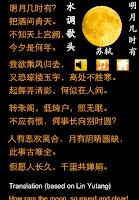
A poem "Thinking of You" is provided as a special module. The poem was written by Su Shi (1037 – 1101), a famous poet in Song Dynasty. The song version of this poem was performed by Teresa Teng(1953 – 1995) and Faye Wang. Their songs "但愿人长久" and "明月几时有" could be easily found on YouTube.
You can learn 10 simple sentences via their sound clips and pin-yin versions.
A poem "Thinking of You" is provided as a special module. The poem was written by Su Shi (1037 – 1101), a famous poet in Song Dynasty. The song version of this poem was performed by Teresa Teng(1953 – 1995) and Faye Wang. Their songs "但愿人长久" and "明月几时有" could be easily found on YouTube.
Enjoy learning Chinese in fall and feel free to send me any comments.
Note: Regarding the poem, one of the sentences "又恐琼楼玉宇" is "唯恐琼楼玉宇" in traditional Chinese version. Teresa and Faye used the latter version of this sentence in their songs. Additionally, the right pronunciation of "绮“ is qǐ instead of yǐ. See also "低绮户" in the songs.
This is my second app. Waiting for review.
Subscribe to:
Posts (Atom)